Skip to content
Built for repeat trade buying

Give dealers a faster route from SKU to order.

Your wholesale buyers often know what they need. Anyweb can design a dealer portal around quick SKU entry, approved catalog access and repeat ordering, using the B2B capabilities available on your Shopify plan and the systems your team already operates.

Free first look. Scope, connections and costs agreed before a production build.

A familiar front door.Carefully defined access behind it.
Parts & catalogsCONCEPT
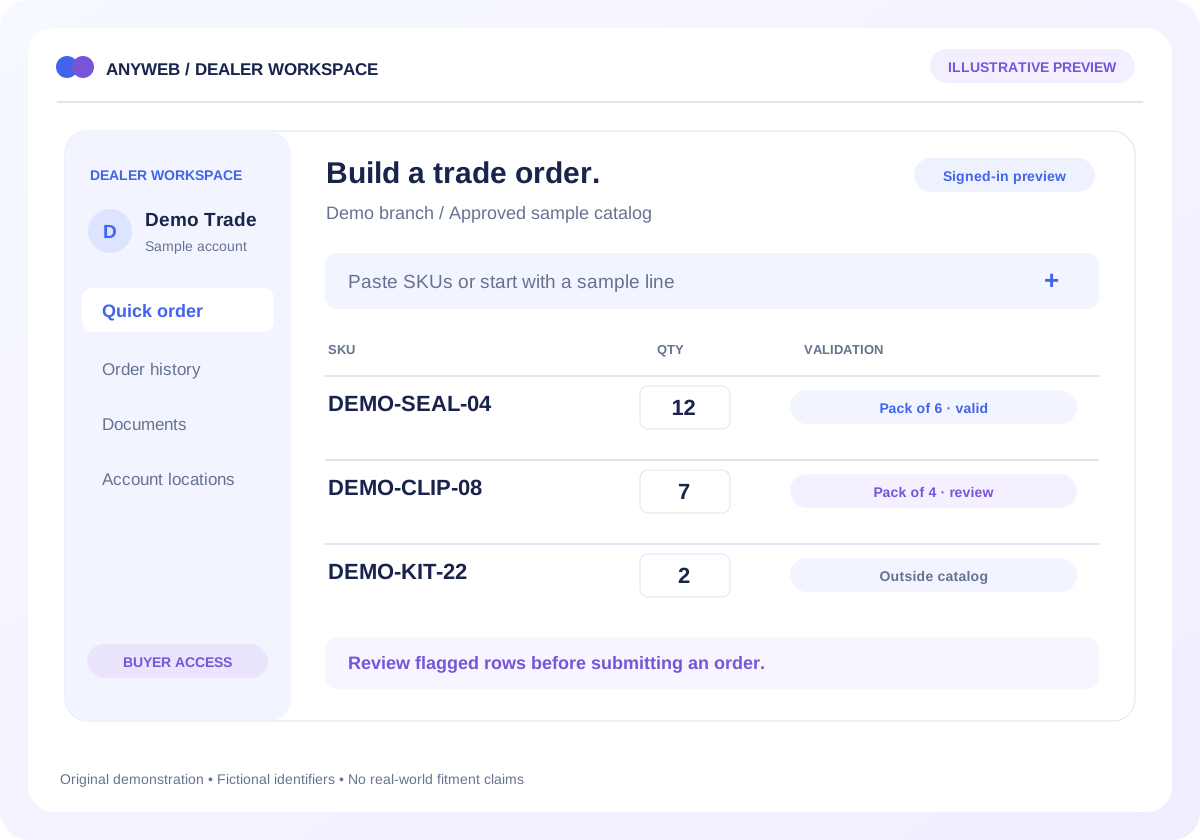
Illustrative signed-in dealer portal with a fictional trade account, SKU quick-order rows and case-pack validation
Illustrative concept · Built around your business
01

Map access before designing the catalog

Document how dealers apply, who approves them and which company locations they may order for. Separate account administrators from buyers where needed. Test that one dealer cannot retrieve another dealer’s restricted information.

  • Approval and revocation workflow
  • Company and location context
02

Use the right Shopify B2B entitlement

Shopify currently documents up to three active B2B market catalogs on Basic, Grow and Advanced, with unlimited catalogs and direct company assignment on Plus. We confirm current entitlements against your pricing structure before recommending the implementation.

  • Catalog count and assignment rules
  • Native features before custom work
03

Make a long order easy to review

Build around SKU entry, pasted lists or a reviewed purchase-order upload. Validate product access, quantities and case packs before accepting the order. Unknown codes need actionable row errors instead of silently disappearing.

  • Case-pack and minimum checks
  • Reorder review against current terms
04

Connect documents only where supported

A portal can surface permitted product documents and links to connected order records. Invoice retrieval, credit status and backorder dates depend on your systems and authorization; they are scoped individually rather than assumed.

  • ERP identifier mapping
  • Document access and update ownership
A CONCRETE FIRST LOOK

A quick order that catches a pack mismatch

Illustrative data, designed to make the workflow easier to discuss.

SAMPLE WORKSPACE
A quick order that catches a pack mismatch; fictional example data
Fictional SKURequested quantityReview result
DEMO-SEAL-0412Valid: pack of 6
DEMO-CLIP-087Review: pack of 4
DEMO-KIT-222Not in sample dealer catalog

Illustrative account and rules. No real contract prices, customer data or credit terms are displayed.

See a role-based view

A small illustration of how the same portal can serve different responsibilities.

  • Their own account information
  • Approved documents and updates
  • Their own requests and status
Local concept only. Switching this demo is not authentication. Production access must be enforced and tested on the server for every protected record.
FROM IDEA TO A WORKING PROCESS

A clear path through the work.

Each step makes the dependencies, decisions and handoffs visible.

  1. 01

    Define dealer rules

    Review account types, location structure, catalogs and the Shopify plan in use.

  2. 02

    Prototype quick ordering

    Test a representative order with valid SKUs, pack mismatches and unavailable items.

  3. 03

    Verify the boundaries

    Check account isolation, pricing, order submission and exception ownership before rollout.

REAL WORK. CLEAR CONTEXT.

Explore the relevant building blocks.

These references show related experience. The solution above is a proposed direction, and its exact scope is agreed for your project.

BEFORE YOU START

The useful questions.

What is possible depends on your data, existing systems and the way your business works.

Can dealers see different prices?

Yes, where the chosen catalog and account configuration supports it. The exact assignment method depends on your Shopify plan and the number of pricing groups.

Can buyers upload a purchase-order spreadsheet?

A custom upload workflow can validate permitted SKUs and quantities, then present a review screen. The accepted file format and final ordering process need to be agreed.

Is Shopify Plus required for all B2B features?

No. Current Shopify documentation describes B2B catalogs on several plans. Plus provides additional catalog capacity and assignment options; verify the features your specific portal needs.

Can it show ERP invoices and backorders?

Only when the ERP provides suitable access and the dealer is authorized to view the records. We assess the API or export, freshness and account mapping first.

FREE DEMO BEFORE YOU COMMIT

Let’s make the first version useful.

Bring the current workflow and the result you want. We’ll review the dependencies and shape a free demo or concept before you decide on the build.

No upfront payment for the demo. No obligation to continue.
Technical references and further reading

Provider documentation helps define scope. Availability, terms and product capabilities should be checked again for your exact configuration.