Skip to content
KNOW BEFORE THE NEXT ORDER

Make inventory failures visible.

A green import message can hide bad data. Anyweb builds supplier-feed monitoring that checks arrival, content and publication, then gives your team a clear way to review failures before they spread through the store.

Free first look. Scope, connections and costs agreed before a production build.

OverviewRulesReview queue
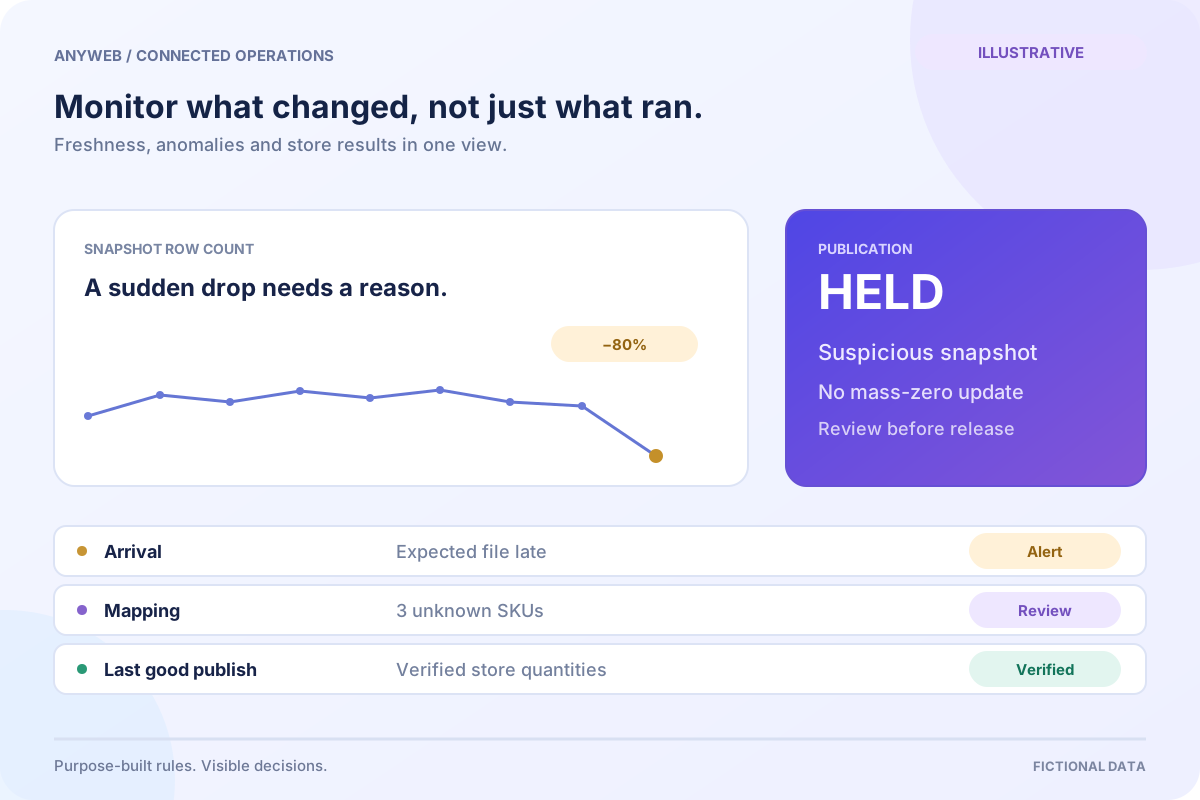
Illustrative feed-health dashboard highlights a late supplier file, an 80 percent row-count drop held for review, and a verified successful Shopify publication.
Illustrative concept · Built around your business

Illustrative workspace, not live operating data

A CONCRETE FIRST LOOK

Illustrative feed-health checks

Illustrative data, designed to make the workflow easier to discuss.

SAMPLE WORKSPACE
Illustrative feed-health checks; fictional example data
CheckObserved resultResponse
Expected filePast agreed windowNotify feed owner
Snapshot row count80% below baselineHold publication
Shopify write result3 unmatched variantsReview affected rows

Fictional monitoring scenarios. Thresholds and response times are agreed for each source; alerts do not eliminate stock discrepancies.

Try a stock buffer

Move the controls to see one possible inventory rule.

Sample quantity to publish15

Supplier quantity minus the safety buffer, never below zero.

Local simulation only. No supplier or Shopify connection. A buffer reduces exposure; it cannot guarantee stock or prevent every oversell.
01

Measure the source’s expected behavior

Record when each source should arrive and how old its underlying data may be. Daily files, hourly polling and event-driven sources need different thresholds. Quiet periods should not trigger the same response as a missed business-day delivery.

  • Track source time and receipt time separately
  • Assign a responsible owner per feed
02

Check the shape and meaning of each update

Validate required fields, row counts, duplicate identifiers and quantity ranges. Compare large movements with the previous accepted snapshot. A missing product is different from a zero-stock product, particularly in a change-only feed. Unusual updates can wait for explicit review.

  • Flag unknown SKUs and unit changes
  • Detect suspicious catalog-wide stock collapse
03

Verify the publishing result

A file being accepted by the parser does not mean Shopify accepted every update. Capture failed records and confirm the resulting store state for the agreed checks. Distinguish source failures, mapping errors and destination write failures so the right person can investigate.

  • Show the last successful publication
  • Keep retryable failures separate from invalid data
04

Make alerts lead to a decision

An alert should say which supplier failed, which products are affected and what has been paused. Agree whether stale stock stays visible, receives a tighter buffer or stops selling after a defined threshold. Recovery uses a verified source and a reviewed change set.

  • Avoid repeated alerts for the same incident
  • Do not restore old quantities over newer sales blindly
FROM IDEA TO A WORKING PROCESS

A clear path through the work.

Each step makes the dependencies, decisions and handoffs visible.

  1. 01

    Observe

    Check arrival and source freshness.

  2. 02

    Compare

    Detect structural and stock anomalies.

  3. 03

    Hold

    Pause changes that breach your rules.

  4. 04

    Recover

    Review and verify a safe update.

REAL WORK. CLEAR CONTEXT.

Explore the relevant building blocks.

These references show related experience. The solution above is a proposed direction, and its exact scope is agreed for your project.

BEFORE YOU START

The useful questions.

What is possible depends on your data, existing systems and the way your business works.

Can a bad feed set everything to zero?

A protective rule can hold a suspicious mass-zero update before publication. The correct threshold depends on the source and normal business changes.

How soon will I know a sync failed?

That depends on the feed schedule, monitoring interval and alert route. We define those expectations instead of promising instant detection.

Can staff pause an unusual change?

Yes. A review queue can show the proposed impact and require approval before the held update is released.

Can monitoring fix every failed sync?

No. Expired access, supplier outages and changed business rules may need intervention. Monitoring should make the cause and next step clear.

FREE DEMO BEFORE YOU COMMIT

Let’s make the first version useful.

Bring the current workflow and the result you want. We’ll review the dependencies and shape a free demo or concept before you decide on the build.

No upfront payment for the demo. No obligation to continue.
Technical references and further reading

Provider documentation helps define scope. Availability, terms and product capabilities should be checked again for your exact configuration.