Skip to content
IDENTIFY / VERIFY / FIND
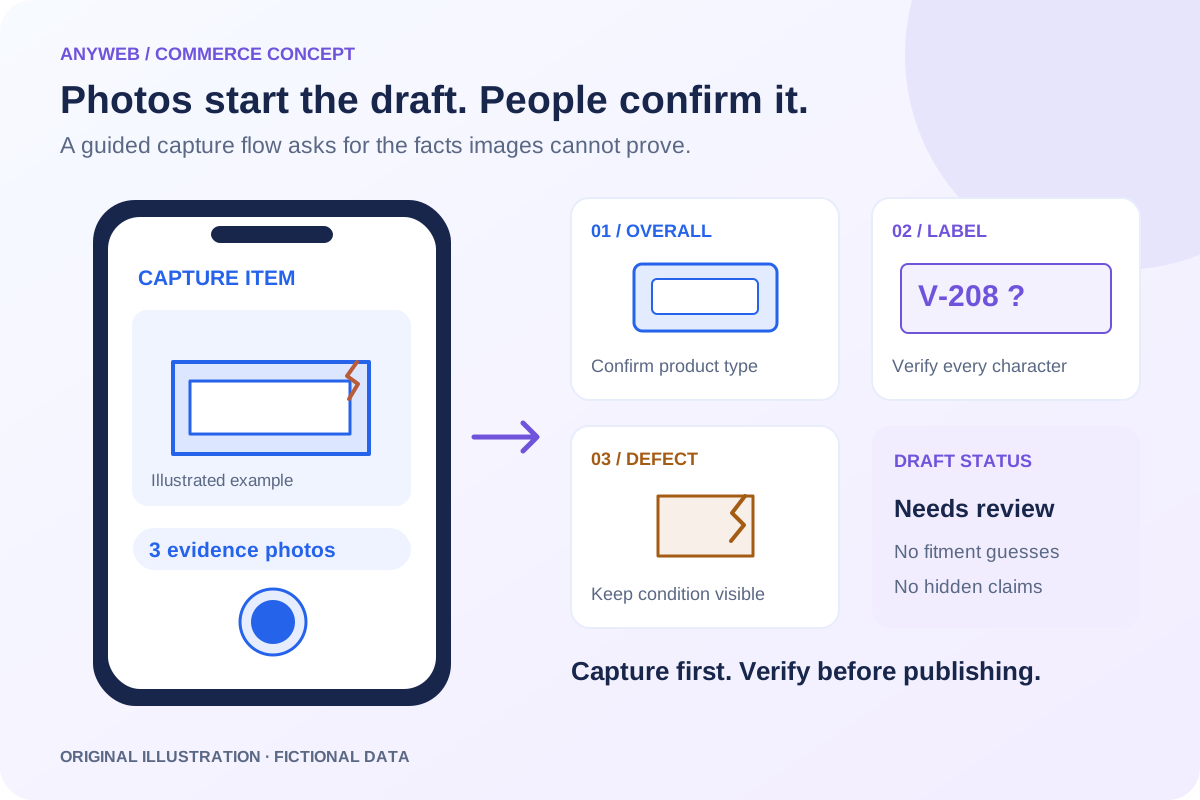
Original mobile capture composition with three illustrated photo frames, a readable-label prompt and a product draft awaiting human confirmation.
Illustrative concept · Built around your business
Model dataPart recordsReviewed links
CAPTURE. CONFIRM. CREATE.

Take photos. Prepare a product draft. Review and publish.

Photos can start a listing, but they cannot prove every product fact. Anyweb builds a mobile-friendly capture workflow that suggests structured content, asks for missing identifiers and saves a Shopify draft for review.

Free first look. Scope, connections and costs agreed before a production build.

A CONCRETE FIRST LOOK

Illustrative photo-to-draft review

Illustrative data, designed to make the workflow easier to discuss.

SAMPLE WORKSPACE
Illustrative photo-to-draft review; fictional example data
Captured inputSuggested outputRequired check
Overall component photoPossible vent coverConfirm product type
Label photographCandidate part numberVerify readable characters
Cracked corner photoCondition noteKeep defect in final listing

Fictional intake example with original line illustrations, not real inventory photography or proof of image-identification accuracy.

01

Guide staff through useful photographs

Ask for an overall image, a readable label and any visible defects. Keep the actual item photos connected to the draft and allow retakes before upload. A required-photo checklist can vary by product family, so a control board gets different prompts from a cabinet handle.

02

Separate suggestions from verified facts

Image-assisted suggestions can propose a category or draft title. Staff must confirm identifiers, measurements, test status and compatibility evidence. A confidence score does not turn a guess into proof; uncertain fields should remain blank or clearly pending until checked.

  • Suggestions visibly marked for review
  • Label, measurement and condition prompts
03

Save work before it is complete

Support a draft queue so a staff member can capture an item now and finish details later. Preserve the item ID across retries and resumed sessions to avoid duplicate products. If a photo upload fails, show which image is missing instead of declaring the draft ready.

04

Review the product the shopper will see

Bring photos, generated wording and confirmed facts together in a preview. Check that defects remain visible and unsupported claims were not added. Create the Shopify record with an explicit draft status, then publish only after required fields and destination choices have been approved.

FROM IDEA TO A WORKING PROCESS

A clear path through the work.

Each step makes the dependencies, decisions and handoffs visible.

  1. 01

    Capture the evidence

    Photograph the item, identifier label and visible defects.

  2. 02

    Confirm missing facts

    Enter dimensions, condition, test status and reliable compatibility information.

  3. 03

    Approve the draft

    Check wording and images, then publish to the intended storefront.

REAL WORK. CLEAR CONTEXT.

Explore the relevant building blocks.

These references show related experience. The solution above is a proposed direction, and its exact scope is agreed for your project.

BEFORE YOU START

The useful questions.

What is possible depends on your data, existing systems and the way your business works.

Can it identify any product from one image?

No. Similar parts can look alike, and important details may be hidden. The workflow requests label photos and confirmation rather than promising universal identification.

Can staff use their phones?

A mobile-friendly capture interface can be built for the devices and connection conditions your team uses. Camera permissions and upload behavior are tested during implementation.

Can staff save unfinished drafts?

Yes. Keep an item in the review queue while measurements or testing are incomplete. Resuming the same item should not create another product.

Can it infer whether a part works?

No. Function, hidden damage and safety cannot be established from appearance alone. Staff must record relevant testing and avoid unsupported claims.

FREE DEMO BEFORE YOU COMMIT

Let’s make the first version useful.

Bring the current workflow and the result you want. We’ll review the dependencies and shape a free demo or concept before you decide on the build.

No upfront payment for the demo. No obligation to continue.
Technical references and further reading

Provider documentation helps define scope. Availability, terms and product capabilities should be checked again for your exact configuration.